Can You Send Cold Email From a Free Gmail Account?
inboxy team · · 3 min read
Why a free Gmail account doesn't work for cold email
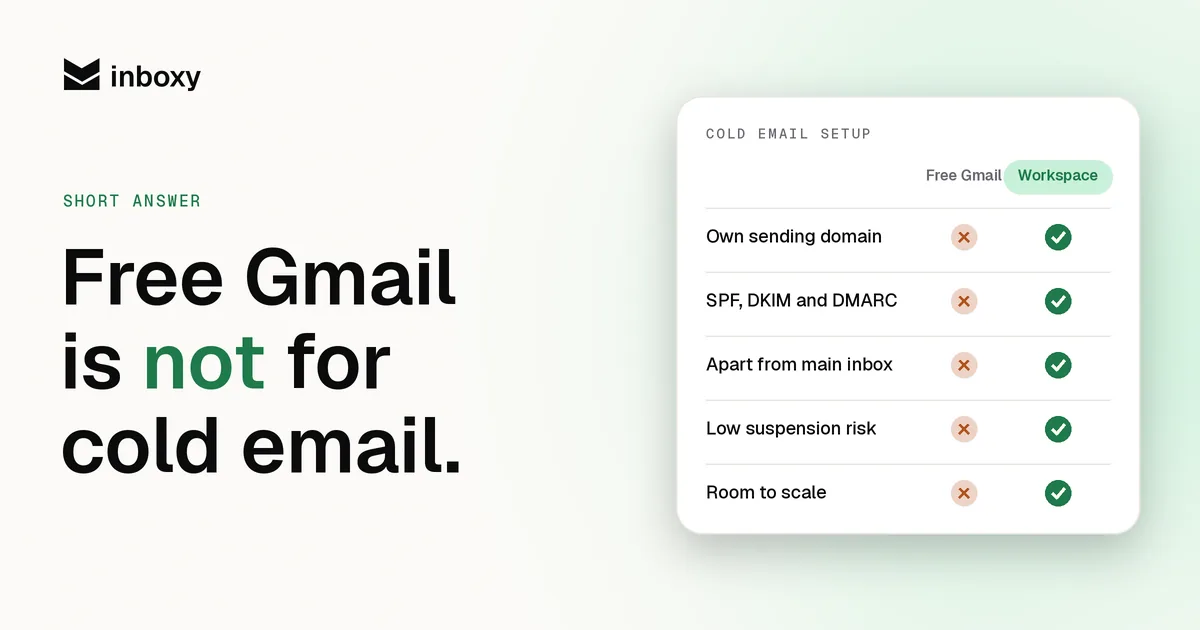
- Low limits. Free Gmail accounts can send to around 500 recipients a day, and Google can lower that or pause sending if it sees unusual activity. Google Workspace allows 2,000 messages a day per user. See Google Workspace sending limits.
- No domain of your own. You can't publish SPF, DKIM or DMARC for gmail.com, and you can't separate your cold email reputation from anything else. Gmail, Yahoo and Microsoft now expect authenticated mail from bulk senders. See the sender requirements.
- It looks personal, not professional. A B2B buyer seeing an offer from a @gmail.com address has every reason to treat it as spam.
- Account risk. Google's policies don't allow unsolicited bulk email from consumer accounts. If the account is suspended, you lose everything in it, not just a campaign.
Free Gmail vs Google Workspace for cold email
| Free Gmail | Google Workspace | |
|---|---|---|
| Daily sending | Around 500 recipients | 2,000 messages per user |
| Your own domain | No | Yes |
| SPF, DKIM, DMARC | Not under your control | Yes, on every domain |
| Works with sequencers | Limited | Yes |
| Separate reputation per domain | No | Yes |
The daily limit is not the number to aim for. Even on Workspace, cold email teams send 30 to 50 emails per inbox a day and add inboxes to scale.
What to use instead
- Buy two or three separate lookalike domains for cold email.
- Create two or three Google Workspace mailboxes on each one.
- Publish SPF, DKIM and DMARC. See our setup guide.
- Warm every mailbox for two to four weeks.
- Connect them to your sequencer and send 30 to 50 a day per inbox.
Our guide on how many mailboxes you need works out the numbers for your volume.
Is it ever OK to use Gmail?
For a handful of genuinely personal, one-to-one emails, typed and sent by hand, a personal Gmail address is fine. The moment it is a list, a template or a sequencer, use a real domain on Google Workspace.
Skip the setup
inboxy creates Google Workspace mailboxes on your cold email domains with SPF, DKIM and DMARC already configured, connects them to your sequencer for free and keeps them warm, at a flat $3 per mailbox a month. See pricing.
quick answers
Can I send cold email from a free Gmail account?
Not safely. Free Gmail has low sending limits, no domain authentication you control, and Google can suspend the account for bulk sending. Use Google Workspace on your own domains instead.
How many emails can a free Gmail account send per day?
Around 500 recipients a day. Google Workspace allows 2,000 messages a day per user, but cold email teams still keep each inbox at 30 to 50 a day.
Can I connect a free Gmail account to a sequencer?
Some tools allow it, but the account still has consumer limits and no authentication on your own domain. It is not a setup that scales.
Is Google Workspace better than Gmail for cold email?
Yes. Workspace runs on your own domain, so you can publish SPF, DKIM and DMARC, keep cold email reputation separate from your main domain, and add mailboxes as you scale.
What should I use instead of Gmail for cold email?
Google Workspace mailboxes on two or three separate lookalike domains, with SPF, DKIM and DMARC set up and two to four weeks of warmup before you send.